The building blocks we use to create custom Automation & AI solutions for your business.
Workflow Automation
End-to-end process automation connecting your existing tools into seamless, reliable workflows.
n8nMakeZapierWebhooks
LLM & AI Integration
Production-ready integrations with leading AI models, including prompt engineering and RAG systems.
OpenAIAnthropicRAGEmbeddings
Generative AI
Multi-modal content generation: AI-powered text, image enhancement, and video creation pipelines.
GPT-4oImage AIVideo AIVeo
Full-Stack Development
Custom web applications, APIs, and backend systems built for performance and scalability.
PythonFastAPIPostgreSQLReact
Data & Analytics
Data pipelines, automated reporting, and dashboards that turn raw data into actionable insights.
ETLDashboardsXero APIForecasting
Cloud & DevOps
Secure deployment, containerisation, and infrastructure management for reliable, scalable systems.
DockerLinuxCI/CDMinIO/S3
See What We've Built
From AI-powered property listings to automated cash control systems, explore real-world examples of how we've helped businesses streamline operations and unlock new capabilities with Automation & AI.
Real Estate AI
Finance Automation
Inventory Intelligence
RAG Expert Hubs
From Idea to Insight, Fast.
1. Discover
We start with your goals. We'll identify the high-impact areas in your business where Automation & AI can deliver a clear, immediate ROI.
2. Build
No theoretical projects. We build and deploy a secure, custom Automation or AI tool, integrating it directly into your workflow.
3. Listen
This is the magic step. We integrate analytics and feedback loops to capture what your customers *actually* want and where your operations *actually* break.
4. Align
We help you use this new, real-time data to make smarter, faster business decisions—aligning your marketing, product, and strategy to real demand.
Blog, Insights & Case Studies
Deep dives into real projects and practical Automation & AI applications, from early experiments to full go-to-market engines.
Generative AI · Real Estate
AI-Powered Property Listings: Text, Image & Video in One Platform
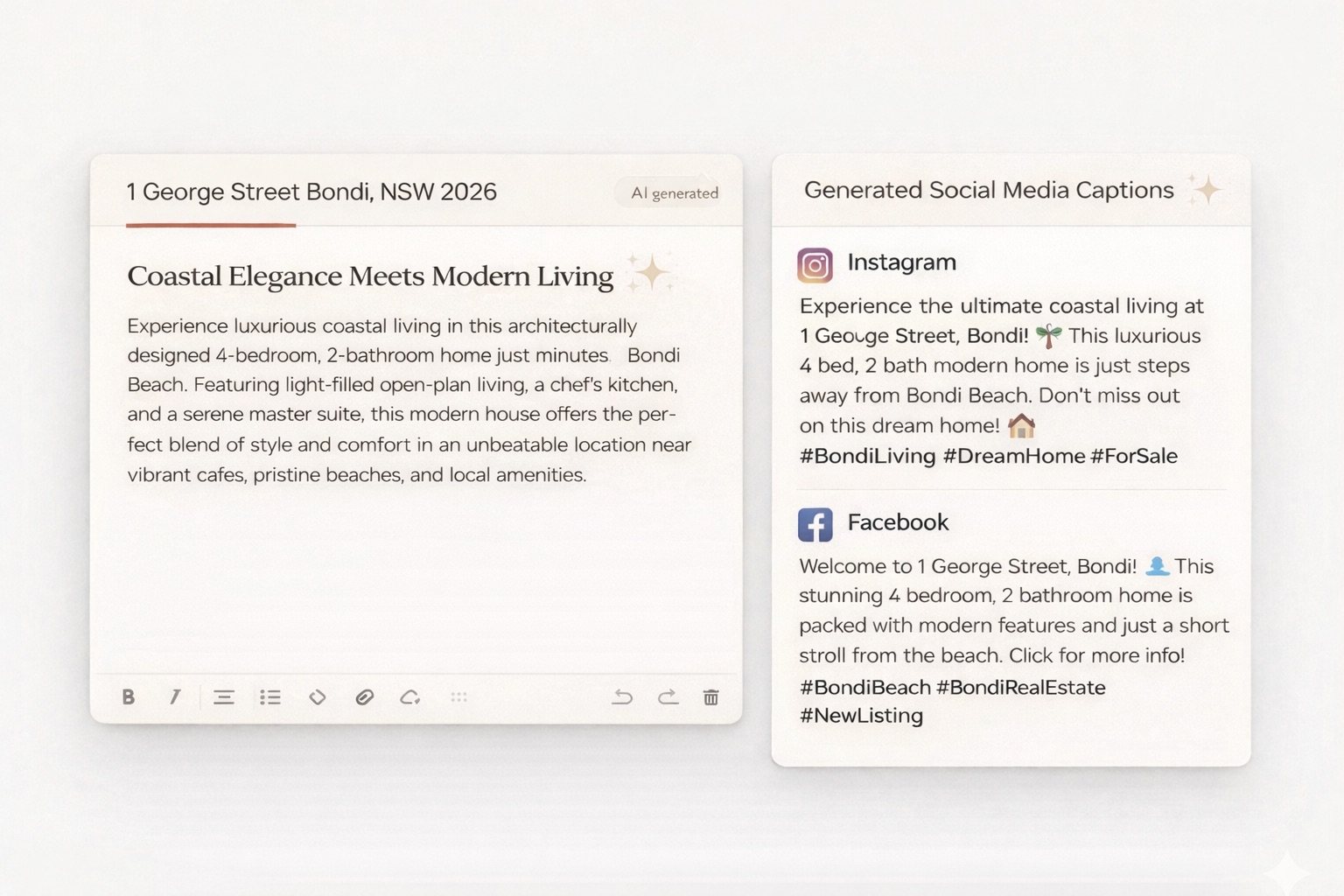
How we built a full-stack AI solution that turns property addresses into professional listings—complete with AI copy, enhanced photos, and marketing videos.
Tags: AI Copy · Image Enhancement · Video Generation · Real Estate
AI Bot to Go-To-Market Engine
Dulk's Expert Hub: From AI Bot to GTM Engine
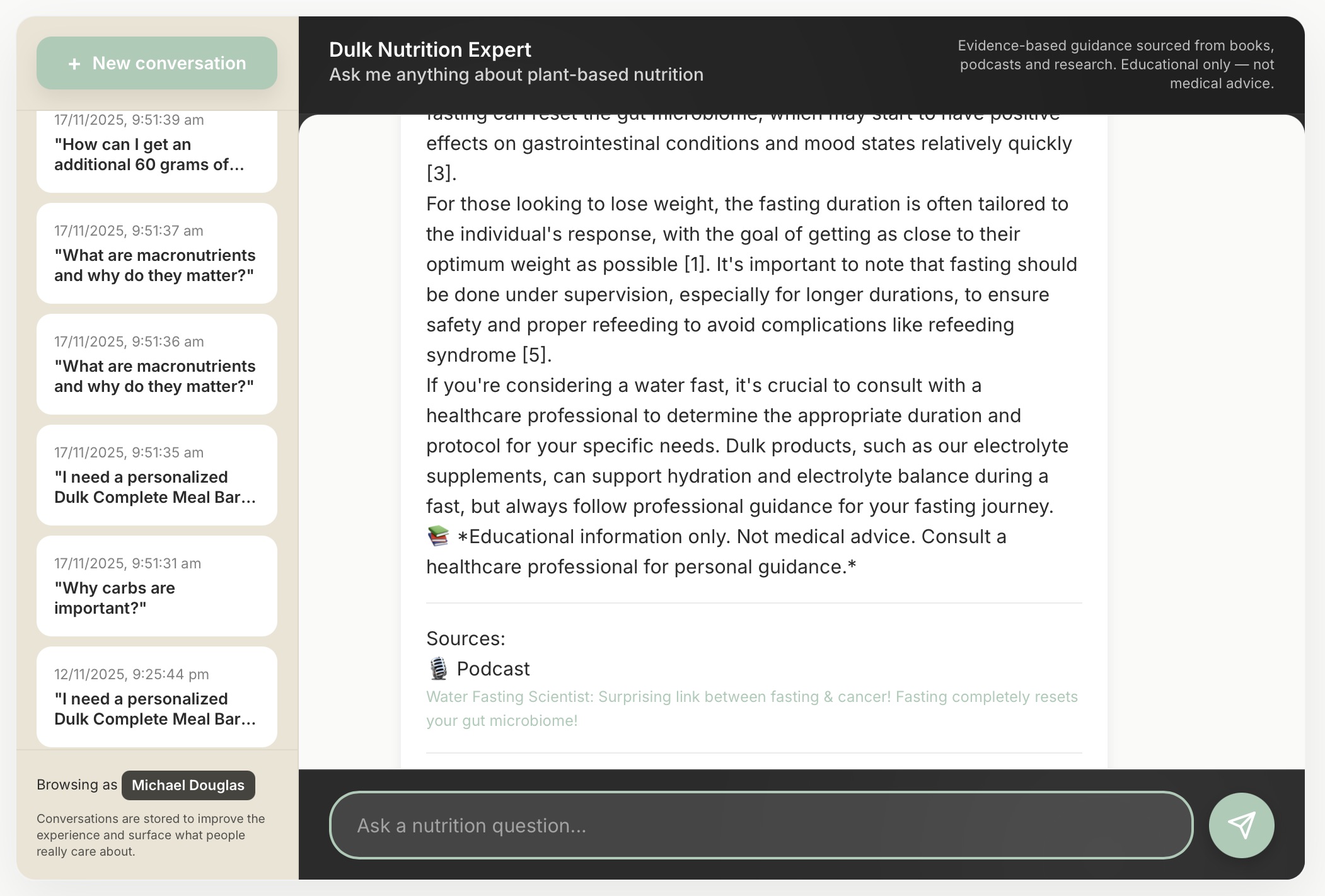
How a RAG-powered Expert Hub turned real user questions into a sharper brand and GTM strategy.
Tags: RAG · Brand Trust · GTM Insight Engine
Finance Automation
Cash Control Digest with AI: Stay on Top of Cash in 60 Seconds a Day
Automated Daily Cash Control Reports from Xero: instant visibility, zero manual work, better decisions.
Tags: Xero · Cash Flow · Finance Automation
Inventory Automation
AI-Powered Inventory Control: Stop Bleeding
How Loopsu Inventory Intelligence transforms chaotic Excel spreadsheets into real-time stock visibility, AI forecasting, and automatic replenishment.
Tags: Inventory · Stock Management · AI Forecasting
Generative AI · Text Generation · Image Enhancement · Video Creation
Building an AI-Powered Property Listing Platform: Where Text, Image, and Video Generation Converge
Real estate agents spend 3+ hours creating each property listing—writing descriptions, editing photos,
and coordinating marketing materials. We built a platform that uses three distinct AI capabilities
to compress this into minutes. Here's how the technology came together.
The Hidden Time Tax in Property Marketing
Every property listing requires a surprisingly similar workflow: gather details, write compelling copy,
enhance photos to look professional, and increasingly, create video content for social media.
For busy agents juggling multiple listings, this repetitive work becomes a significant bottleneck.
3+ hrs
Per listing creation
$500+
Cost if outsourced
80%
Time on non-selling tasks
The question wasn't whether AI could help—it was whether we could integrate
text, image, and video generation into a single, coherent workflow
that non-technical users could actually use. The result is
Realestate.ai,
a platform built specifically for Australian real estate agents.
Three AI Engines, One Workflow
The platform orchestrates three distinct AI capabilities, each chosen for its specific strength:
Text Generation (OpenAI GPT-4o)
Carefully crafted prompts incorporate property context, selling vibe, and agent tone
to generate headlines, descriptions, and social captions.
Image Enhancement (Google Nano Banana AI)
Room-specific enhancement that corrects lighting and colour—without fabricating
features that don't exist. Ethics built in.
Video Generation (Google Veo AI)
Two-stage process: generate a lifestyle scene from property photos, then animate
into social-ready video clips.
The Platform in Action
Step 1: AI Property Lookup — auto-fills property details from Domain & REA.
Step 2: AI Copy — headlines, descriptions, and social captions.
Step 3: Image Enhancement — professional lighting correction.
Step 4: AI Video — lifestyle videos for social media.
Technical Architecture Note
The platform runs on a FastAPI backend with n8n workflow automation orchestrating the AI calls.
This separation proved essential: long-running AI tasks (especially video generation) can take minutes,
so we use webhook callbacks rather than blocking API calls.
▸Backend: FastAPI + PostgreSQL
▸Orchestration: n8n workflows
▸Storage: MinIO (S3-compatible)
▸Payments: Stripe subscriptions
What We Learned Building This
Prompt engineering is product design
The difference between "good enough" and "actually useful" AI output came down to prompt
refinement. We iterated through dozens of prompt versions, testing with real property data,
before the copy generation felt right for Australian real estate conventions.
Async is non-negotiable for generative AI
Video generation can take 60+ seconds. Image enhancement, 10-30 seconds. Building a responsive
UI meant embracing webhook callbacks and background job processing from day one—not retrofitting it.
Ethical constraints improve the product
Our "no fabrication" rule for image enhancement initially felt like a limitation. In practice,
it became a selling point. Agents don't want to mislead buyers—they want photos that look
professional while remaining honest.
The Outcome: From Hours to Minutes
Before
✗3+ hours researching, writing, editing per listing
✗$50-150 for professional photo editing
✗$300-500+ for marketing video production
✗Days of back-and-forth with vendors
After
✓10-15 minutes from address to full package
✓Unlimited image enhancements included
✓AI videos ready for social platforms
✓Same-day turnaround, every time
The Bigger Picture: Multi-Modal AI in Practice
This project demonstrated something we're seeing across industries: the real power of generative AI
isn't in any single capability—it's in combining text, image, and video
generation into workflows that previously required multiple specialists, tools, and handoffs.
Real estate was a good proving ground because the workflow is well-defined and the pain point is
universal. But the pattern—orchestrating multiple AI engines behind a simple interface—applies
far beyond property listings. See it in action at
realestatekit.ai.
Work with Loopsu
Exploring something similar for your business?
If you're thinking about combining multiple AI capabilities into a cohesive product or workflow,
we'd be happy to share what we learned and explore whether our approach could work for your context.
Dulk's Expert Hub: How a 6-week panel turned an AI bot into a Go-to-Market strategy engine
Loopsu designed a RAG-powered “Expert Hub” for Dulk, a new food venture, connecting trusted nutrition sources with real user conversations, and used that signal to reshape the brand’s GTM.
From Books and Podcasts to Breakthrough
Loopsu's RAG system, fed with trusted expert sources (books and podcasts), didn't just build brand confidence—it uncovered the real performance needs of Dulk's audience and shaped a sharper, more aligned Go-to-Market plan.
The "Revealed" Insight
The panel's top questions weren't about having a perfectly
"balanced meal-replacement", as initially framed.
They centred on "sustained energy" and
"showing up at their best every day", without compromising on food quality.
The Brand GTM Shift
Dulk shifted its core message from "a nutritionally balanced meal-replacement" to
"performance nutrition that powers your day, so you can give your best with zero compromise on food."
This immediately resonated with test users.
The Product GTM Shift
The performance and energy angle was elevated from a supporting benefit to the
core launch promise, prioritising steady energy, focus, and convenience—so customers can perform at their best every day while still eating food they trust.
Strategic Takeaways
The "Revealed" Insight
Panel's top questions weren't about having a perfectly
"balanced meal-replacement" on paper.
They focused on "sustained energy" and
"performing at their best every day" without compromising on food quality.
The Brand GTM Shift
Core message evolved from "a nutritionally balanced meal-replacement" to
"Performance nutrition that powers your day, so you can give your best with zero compromise on food."
The Product GTM Shift
The performance and energy dimension was elevated from a supporting benefit to the
core launch promise, prioritising steady energy, focus, and convenience so customers can perform at their best every day.
Work with Loopsu
Exploring something similar for your business?
If you’re thinking about using automation or AI in a similar way, we’re always happy to compare notes
and see whether our approach could fit your context.
Cash Control Digest with AI: How One Team Got a Daily View of Cash in 60 Seconds
In this project, we worked with a growing services business using Xero that wanted a calm,
reliable way to understand cash every morning without logging into multiple systems or
running custom reports.
The Starting Point: Cash Questions Arriving Too Late
Before we started, the leadership team only discovered cash issues when they were already
painful. The patterns were familiar:
•Bank balances felt “off”, but no one had an easy way to see why.
•Large bills or payroll were looming without a shared view of upcoming commitments.
•Overdue customer invoices were picked up late, often when the cash squeeze was already there.
•Answering “Can we afford this right now?” meant someone disappearing into Xero and spreadsheets for an hour.
The team didn’t need a new accounting system. They needed a simple, shared signal that
made cash health visible every day.
Our Approach: A Daily Cash Control Digest from Xero
Together, we designed a small automation around Xero: an
automated Daily Cash Control Digest sent to the team each morning.
The goal was not to replace their accountant, but to give operators a quick, shared view
they could trust.
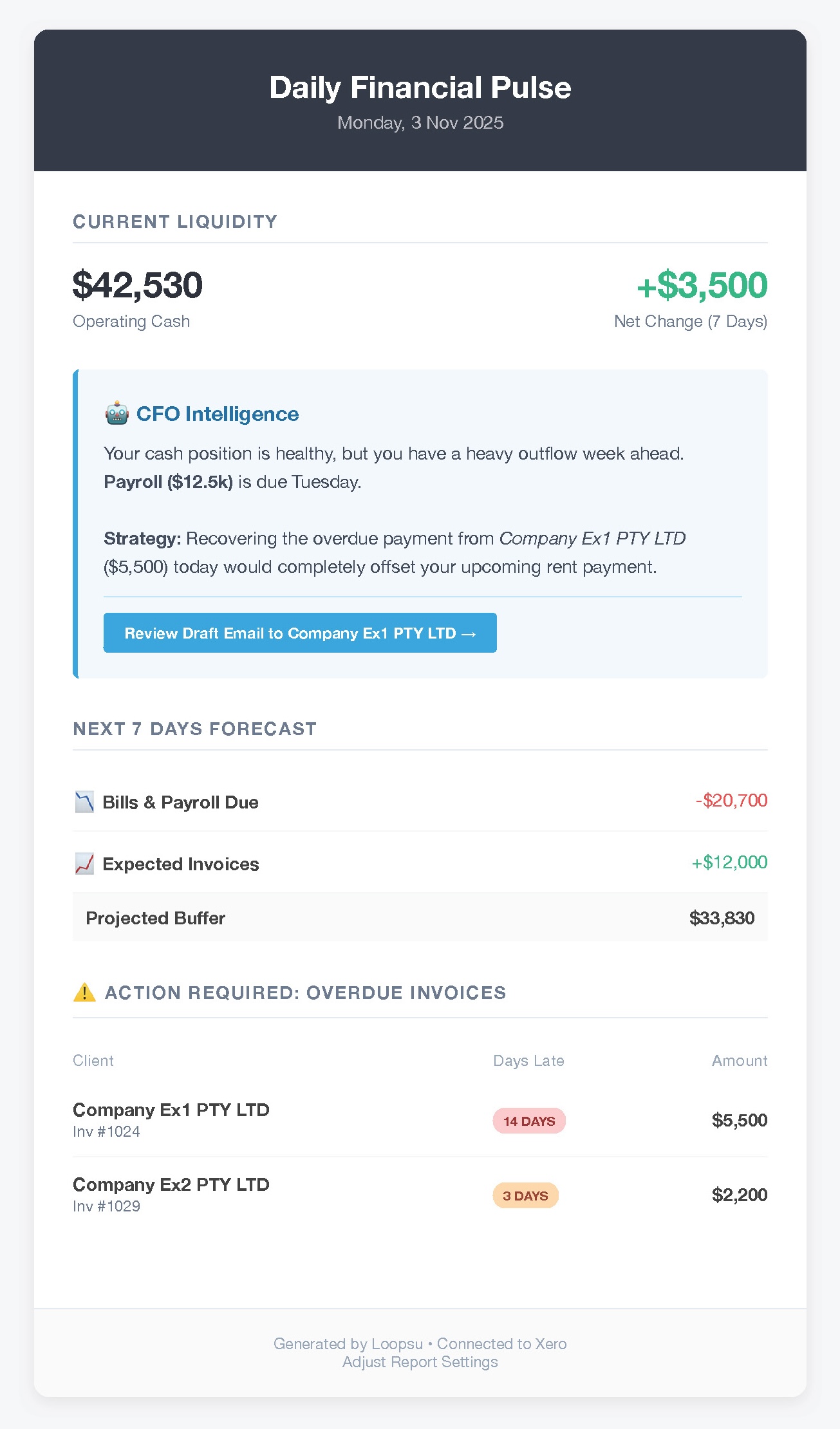
In one page, the digest brings together:
Today's Cash Position
Consolidated view across the main operating accounts.
Recent Revenue & Spend
Last 7 and 30 days, so trends are visible at a glance.
Upcoming Bills & Payroll
Commitments over the next 7 and 30 days, straight from Xero.
Expected Customer Payments
Invoices due in the next 7 and 30 days, highlighting key payers.
Layer of Interpretation
On top of the raw numbers, we added a simple AI layer that flags patterns such as
“watch next Wednesday, large bills + low expected cash in” or “these overdue invoices
are now critical”.
The digest is delivered to email and Slack at the same time every weekday, so it naturally
becomes part of the team’s rhythm.
How It Works Behind the Scenes
1
Connect to Xero
We securely connect to Xero and agree on which accounts and data to use.
2
Nightly Processing
Each night, an automation pulls balances, invoices, bills and recent
transactions, then computes the key indicators.
3
AI Highlighting
An AI layer adds commentary on risk (tight weeks) and attention points
(late payers, unusually high spend, etc.).
4
Delivery to the Team
The digest is formatted into a single visual report and sent to the agreed
channels (email, Slack, Teams).
What the Team Sees
Example Daily Cash Control Digest – all key signals in one glance.
What Changed for the Client
Shared Visibility
Everyone now starts the day with the same picture of cash and upcoming movements,
instead of relying on individual spreadsheets or gut feel.
Cleaner Decisions
Hiring, marketing spend and supplier negotiations are now taken with a much
clearer sense of “where we stand this week and next”.
Fewer Surprises
Cash squeezes are spotted weeks earlier, giving time to act rather than react.
Minimal Extra Work
Once deployed, the system runs from existing Xero data. For the client, it’s just
another email or Slack message in the morning – but a very useful one.
Next Experiment: A Conversational Financial Assistant
Building on this daily digest, we’re now exploring a
financial assistant chat interface that can answer questions
like “What if we bring forward this hire?” or “Which overdue invoices matter most this week?”
using the same underlying data.
The aim is simple: keep humans in charge of decisions, but make it much easier for them to
get a clear, timely view of the numbers.
Work with Loopsu
Exploring something similar for your business?
If you’re thinking about using automation or AI in a similar way, we’re always happy to compare notes
and see whether our approach could fit your context.
Inventory Automation · AI Forecasting · Stock Management
AI-Powered Inventory That Thinks Ahead: From Excel Chaos to a Single, Shared View
This case study comes from a multi-location retailer who had outgrown spreadsheet-based
inventory and wanted a more reliable way to decide what to order, when, and for which site.
The Hidden Cost of Spreadsheet Inventory
The client was running most of their stock control in Excel, with exports from POS and
invoicing systems stitched together by hand. It worked – until it didn’t. The pain points:
•Frequent stockouts on top sellers that directly impacted revenue and customer trust.
•Overstock on slow movers, tying up tens of thousands of dollars in inventory.
•Manual, error-prone updates with no single source of truth across locations.
•No practical forecasting: reorders were often based on intuition rather than data.
•Discrepancies between physical counts and system numbers that only surfaced during big audits.
The team wasn’t looking for a large ERP replacement. They wanted a lighter-weight “brain”
that could sit across the tools they already used and help them think ahead.
Our Approach: An Inventory “Intelligence Layer” on Top of Existing Systems
We built an automation + AI layer that connects Excel, POS, ecommerce platforms and
invoicing systems into a single inventory view. The focus was less on replacing tools and
more on joining them up.
From there, we added a set of capabilities designed around the way their team actually
works in week-to-week operations.
What the System Now Does for Them
1
Real-Time Stock Sync & Alerts
Stock levels from POS, ecommerce and warehouse spreadsheets are consolidated.
Low-stock alerts are raised before shelves are empty.
2
AI-Powered Forecasting
Forecasts combine sales velocity, seasonality and upcoming events to
suggest “order-by” quantities per SKU and per site.
3
Draft Purchase Orders
Based on agreed rules, the system prepares draft POs for suppliers. The
team keeps control by reviewing and approving before sending.
4
Discrepancy Detection
Differences between system records and physical counts are flagged quickly,
prompting targeted checks instead of full-scale audits.
5
Digital Stock-Taking Support
During audits, staff use a simple interface on phones or tablets. Variances
are summarised automatically for follow-up.
6
Monthly Inventory Review
A monthly “inventory story” report highlights slow movers, overstock risks
and where cash is tied up, along with suggested actions.
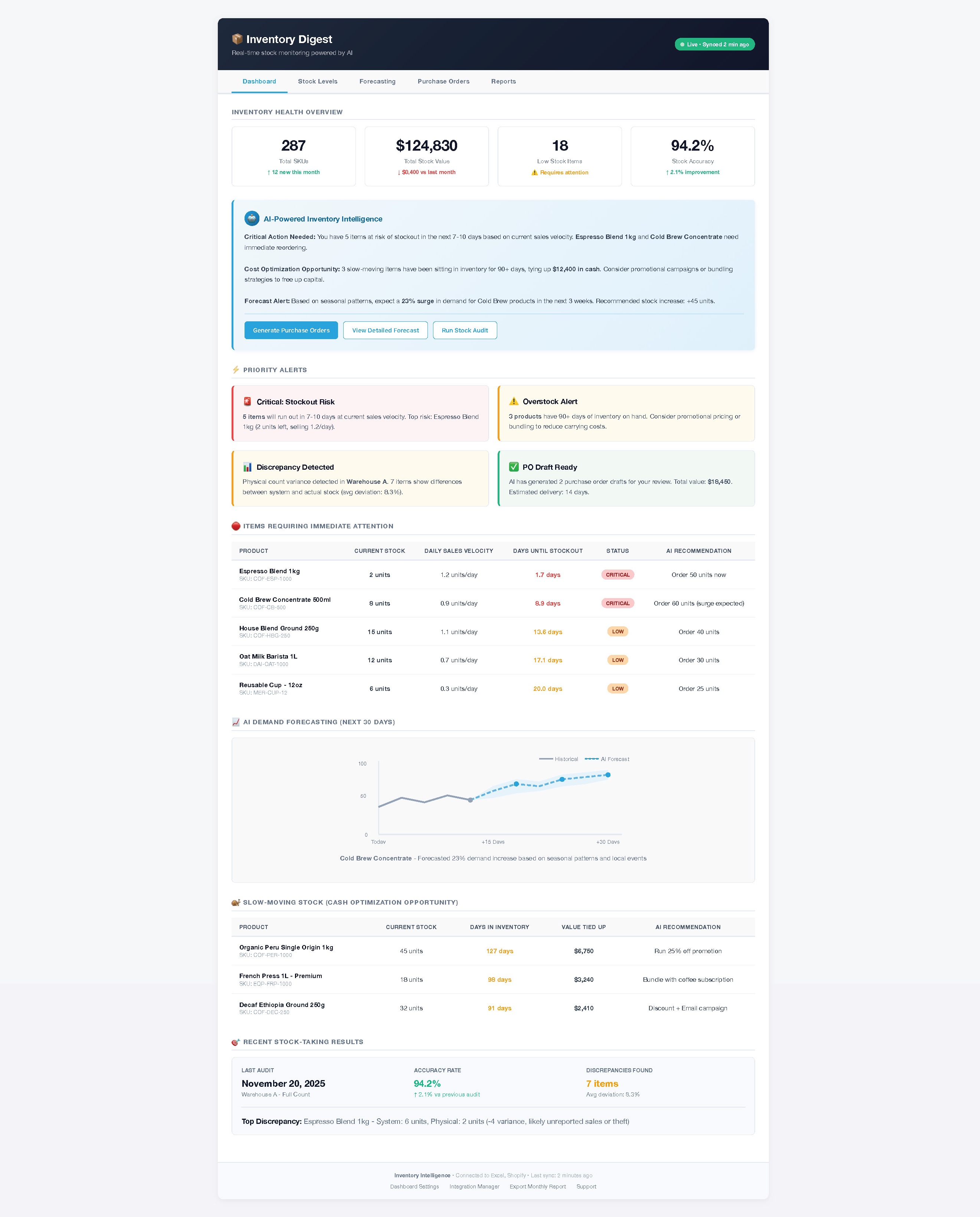
The Inventory Command Center
One place where the team now checks stock levels, alerts and suggestions.
Why This Changed Day-to-Day Work
Better Use of Cash
With overstock visible SKU-by-SKU, the team could plan promotions and buying
pauses, progressively unlocking cash that had been sitting on shelves.
Fewer “We’re Out” Moments
Stockout alerts and forecasting meant bestsellers were rarely unavailable, which
helped protect both revenue and customer experience.
Less Time Wrestling Spreadsheets
Manual consolidation time dropped significantly. Weekly conversations shifted from
“What’s the correct number?” to “Given these numbers, what should we do?”.
Pilot Example: Coffee Roastery
Before
✗Regular stockouts of a flagship espresso blend.
✗Substantial cash locked in niche single-origin SKUs.
✗Many hours each week spent reconciling POS exports with Excel.
✗Stock discrepancies only uncovered during quarterly stocktakes.
✗Seasonal demand (e.g. cold brew) often underestimated.
✓Slow-moving lines identified and progressively cleared, freeing up cash.
✓POs generated automatically, with staff mostly reviewing and approving.
✓Variance alerts pointed to potential theft or recording errors much earlier.
✓Seasonal demand spikes were anticipated using historical patterns.
Exact numbers vary by client, but across pilots we consistently see a mix of freed-up
cash, fewer stockouts, and meaningful time savings for the operations team.
How We Structured This Kind of Project
Rather than a big-bang implementation, we typically structure inventory intelligence work
in layers, starting with visibility and only then adding automation.
• Draft purchase orders and supplier notifications.
• Variance monitoring between counts and records.
• Monthly “inventory story” and continuous refinement.
Scope, timelines and depth depend on each client’s starting point. We usually begin with a narrow pilot to validate impact before scaling.
If your team is wrestling with similar inventory questions and you’d like to see how an
“intelligence layer” could sit on top of the tools you already have, we’re happy to talk
through what we did in this and other projects.
Work with Loopsu
Exploring something similar for your business?
If you’re thinking about using automation or AI in a similar way, we’re always happy to compare notes
and see whether our approach could fit your context.
I'm Eric Amiel, founder of Loopsu, an entrepreneur first, not just a consultant. I built Loopsu with a simple mission: to create the practical, effective AI tools I wished I'd had in my own businesses.
I thrive in fast-paced projects, moving quickly from idea to a functional, value-driven tool. My focus has always been on practical application—developing automations and AI systems that solve real-world operational bottlenecks and unlock new insights.
This "build-for-my-own-business" mindset means I understand your challenges. You don't need theoretical AI; you need a reliable system that delivers a clear ROI. That's what we build at Loopsu.
I'm a dynamic leader with a strong background in technology, operations, and finance.
At We Wander,
I led Operations, Tech, and Finance and remain one of the company's directors.
I'm also a director of
Dulk.
Earlier in my career, I held key roles at Thales, Airbus, and the French Space Agency.
My core expertise sits at the intersection of project management, software engineering, and entrepreneurship.